Which Allen-Bradley 1769-L24ER-QB1B Controller Fits Your Industrial Automation Requirements?
2026-11-17
Article Summary
The Allen-Bradley 1769-L24ER-QB1B is a CompactLogix 5370 L2 programmable logic controller designed for industrial automation applications that require integrated digital I/O, Ethernet-based communication, and flexible control system expansion. With 750 KB of user memory, 16 embedded DC inputs, 16 DC outputs, and two EtherNet/IP ports, it provides a compact control platform for machinery, production equipment, and distributed automation systems.
However, selecting and integrating a PLC involves more than checking its model number. Engineers and purchasing teams need to understand its I/O capabilities, network architecture, expansion limitations, power requirements, programming compatibility, and maintenance considerations. This guide explains the key specifications, practical applications, installation requirements, troubleshooting methods, and purchasing considerations for the Allen-Bradley 1769-L24ER-QB1B.
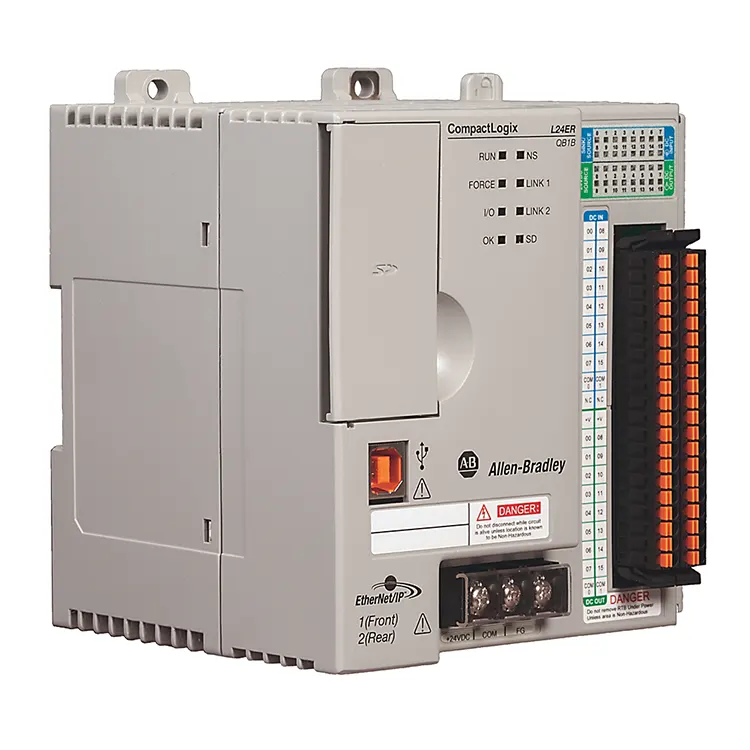
1. What Is the Allen-Bradley 1769-L24ER-QB1B?
The Allen-Bradley 1769-L24ER-QB1B is a programmable logic controller from the CompactLogix 5370 L2 family manufactured by Rockwell Automation under the Allen-Bradley brand. It is designed to manage industrial machine operations, process sequences, digital control signals, and communication between automation devices.
A PLC receives information from connected field devices, processes programmed logic, and sends control signals to output devices. These functions allow industrial equipment to operate according to predefined sequences, safety interlocks, production requirements, and process conditions.
The 1769-L24ER-QB1B combines a controller, embedded digital I/O, an integrated 24V DC power supply, and dual EtherNet/IP ports in one compact unit. This arrangement can reduce the number of separate components required in a control cabinet.
What Does the Model Number Represent?
The catalog number identifies a specific controller configuration within the CompactLogix product family. Buyers should use the complete model number when requesting quotations, checking compatibility, or sourcing replacement equipment.
This is especially important because similar models, such as the 1769-L24ER-QBFC1B, have different embedded I/O configurations. They should not be treated as interchangeable without checking the technical requirements.
2. Key Technical Specifications
Understanding the controller's technical specifications is essential for evaluating whether it meets the requirements of a particular machine or automation project.
| Parameter | Specification |
|---|---|
| Manufacturer | Allen-Bradley / Rockwell Automation |
| Catalog Number | 1769-L24ER-QB1B |
| Product Family | CompactLogix 5370 L2 |
| Controller Type | Programmable Logic Controller |
| User Memory | 750 KB |
| Embedded Digital Inputs | 16 sinking/sourcing 24V DC points |
| Embedded Digital Outputs | 16 sourcing 24V DC points |
| Ethernet Ports | 2 EtherNet/IP ports |
| USB Port | 1 USB programming port |
| Embedded Power Supply | 24V DC input |
| I/O Expansion | Up to 4 compatible 1769 I/O expansion modules |
| Memory Card | 1 GB SD card supplied; supports up to 2 GB |
| EtherNet/IP Nodes | Up to 8 in one Logix Designer application |
| TCP Connections | Up to 120 |
These specifications provide a useful starting point for equipment selection. Actual project compatibility must also account for firmware revision, software version, network topology, electrical loading, and the specific expansion modules used.
Controller Dimensions
The published technical drawings identify approximate overall dimensions of 115 mm in width, 118 mm in height, and 105 mm in depth for the 1769-L24ER-QB1B. Engineers should still consult the manufacturer's mechanical drawings and installation manual to confirm mounting clearance and wiring space.
3. Main Features and Functional Advantages
The 1769-L24ER-QB1B combines several important control and communication functions in a compact industrial controller. Its main advantages are related to integrated I/O, network connectivity, modular expansion, and practical machine control.
Sixteen DC inputs and sixteen sourcing DC outputs simplify connections to compatible field devices.
Two EtherNet/IP ports support suitable linear and device-level ring network arrangements.
Integrated control and I/O functions help organize industrial control cabinets efficiently.
Support for up to four compatible 1769 expansion modules allows additional I/O capacity.
Supported memory cards provide a convenient option for project storage and approved memory-related functions.
EtherNet/IP connectivity supports communication with compatible automation equipment.
Why Integrated I/O Matters
In a machine with a relatively stable number of digital signals, embedded I/O can reduce the need for additional modules and simplify cabinet layout. It also allows designers to connect field devices directly to the controller's designated terminals.
However, engineers should verify the electrical characteristics and output loading requirements before connecting equipment. The controller's digital output rating, load type, and common-terminal arrangement must all be considered.
4. How the Controller Works in an Automation System
The 1769-L24ER-QB1B operates as the central processing unit of a programmable control system. It executes the application logic and coordinates communication between connected equipment.
Basic Control Process
- Signal acquisition: Sensors, switches, and other compatible field devices send digital signals to the controller's input terminals.
- Logic processing: The controller executes its programmed instructions to evaluate machine conditions and operating sequences.
- Output control: The controller updates its digital outputs to operate compatible actuators, relays, and other control devices.
- Network communication: Data is exchanged with supported HMIs, remote I/O devices, drives, and other network participants.
- Continuous monitoring: The controller repeats its control tasks while monitoring system conditions and reporting faults.
Example: Automated Conveyor System
Consider a conveyor system used to move products through a production line. The controller can receive signals from photoelectric sensors, start-stop pushbuttons, and position switches. It then processes the programmed conditions and controls compatible conveyor motor contactors or other output devices.
For example, when a product reaches a detection point, the PLC can activate a sorting sequence, update a counter, and communicate production information to an HMI. Additional networked equipment can exchange status information through a properly configured EtherNet/IP network.
5. Common Industrial Applications
The 1769-L24ER-QB1B can be considered for a range of industrial applications where its digital I/O capacity, processing resources, and communication capabilities match the system requirements.
5.1 Packaging Machinery
Packaging machines use sensors, switches, and actuators to coordinate product feeding, positioning, sealing, and discharge. The controller can manage digital operating sequences and communicate with compatible operator interfaces.
5.2 Conveyor and Material Handling Systems
Conveyors often require coordinated control of motors, product detection sensors, limit switches, and interlocking signals. The controller can manage these operations while exchanging data with other automation devices.
5.3 Assembly and Production Equipment
Automated assembly machines may use multiple digital sensors and actuators to control positioning, clamping, component feeding, and production cycles. The integrated I/O provides a convenient foundation for suitable machine configurations.
5.4 Industrial Process Equipment
Equipment such as pumping systems, material handling units, and auxiliary production machinery may use PLCs to coordinate start-stop sequences, equipment status, and operating interlocks.
5.5 Automated Inspection Systems
The controller can coordinate digital inspection triggers, reject mechanisms, machine status signals, and communication with compatible inspection equipment. Applications requiring extensive analog measurement or high-speed specialized acquisition should be evaluated carefully because the QB1B does not have the analog and high-speed counter I/O built into certain other L2 variants.
6. EtherNet/IP Communication and Networking
Industrial communication is essential for coordinating PLCs, HMIs, drives, distributed I/O, and supervisory systems. The 1769-L24ER-QB1B features two EtherNet/IP ports that support network communication in appropriately configured industrial systems.
Understanding the Two Ethernet Ports
The dual-port arrangement supports network designs such as linear and Device Level Ring (DLR) topologies. This can simplify connections between compatible industrial devices and help reduce the amount of external switching equipment required in suitable configurations.
Common Network Devices
- Human-machine interfaces (HMIs).
- Compatible variable frequency drives.
- Remote I/O systems.
- Other supported controllers.
- Industrial computers and supervisory systems.
Network Configuration Considerations
Correct IP addressing is essential for reliable communication. Engineers should establish an organized addressing plan and ensure that connected devices use compatible subnet settings.
Other important considerations include network bandwidth, device connection limits, switch compatibility, cable quality, electromagnetic interference, and the configuration of ring supervisors where DLR is used.
7. I/O Configuration and Expansion Capabilities
Input and output configuration is one of the most important factors when evaluating the 1769-L24ER-QB1B for a specific machine.
Embedded Digital Inputs
The controller provides 16 embedded 24V DC digital input points. These inputs can receive compatible on/off signals from devices such as proximity sensors, photoelectric sensors, selector switches, and pushbuttons.
The inputs support sinking or sourcing wiring arrangements, subject to the electrical requirements and wiring instructions in the controller documentation.
Embedded Digital Outputs
The controller also provides 16 sourcing 24V DC digital output points. These outputs can control compatible loads and interface devices, including suitable relays, indicators, and control circuits.
Output current limits, common-terminal arrangements, and load compatibility should be verified before installation. Loads exceeding the permitted ratings require suitable external interface devices.
Adding 1769 Expansion Modules
When the embedded I/O is insufficient, the controller can support up to four compatible 1769 I/O expansion modules. This provides additional flexibility for machines that require more digital or other supported I/O functions.
| I/O Requirement | Available Approach | Engineering Consideration |
|---|---|---|
| Digital Inputs | 16 embedded DC input points | Verify signal voltage and wiring arrangement. |
| Digital Outputs | 16 embedded DC output points | Check output ratings and load characteristics. |
| Additional Digital I/O | Compatible 1769 expansion modules | Check module compatibility and system limits. |
| Analog Signals | Compatible external expansion I/O | QB1B does not have built-in analog I/O. |
| High-Speed Counting | Evaluate suitable external solutions | QB1B does not have the embedded counters of the QBFC variant. |
Expansion planning should account for the available module capacity, power budget, physical dimensions, wiring space, and controller compatibility. Do not select modules based only on connector appearance or product-family similarity.
8. Installation, Wiring, and Commissioning
Proper installation is necessary for stable PLC operation. Incorrect wiring, inadequate grounding, poor power quality, or unsuitable environmental conditions can cause intermittent faults and unexpected machine downtime.
8.1 Check the Installation Environment
Before mounting the controller, verify that the control cabinet meets the manufacturer's requirements for ambient temperature, humidity, vibration, ventilation, and electrical protection.
Allow sufficient space for wiring, terminal access, heat dissipation, and maintenance. The published dimensions should be used as a reference, but actual cabinet planning must include all connected modules and cable bend clearances.
8.2 Verify the Power Supply
The controller uses an integrated 24V DC input power arrangement. The supply should meet the specified voltage and current requirements and provide appropriate protection against electrical disturbances.
Check polarity, grounding, terminal identification, and supply capacity before energizing the unit.
8.3 Connect the I/O Wiring
- Identify each input and output terminal using the official wiring diagram.
- Confirm the voltage and electrical characteristics of field devices.
- Separate low-level signal wiring from noisy power cables where practical.
- Use suitable wire sizes and terminal tightening torque.
- Verify common connections and output load arrangements.
- Label cables to simplify future maintenance.
8.4 Establish Ethernet Communication
Connect the Ethernet cables according to the planned network topology. Configure the controller's network parameters and confirm that connected devices have compatible addresses.
8.5 Commission the System
- Inspect the wiring and mounting before applying power.
- Confirm the controller's power and status indicators.
- Connect the programming computer using an appropriate communication method.
- Verify the controller identity and firmware revision.
- Download or restore the approved application project.
- Test individual inputs and outputs under controlled conditions.
- Verify network communication and machine interlocks.
- Complete functional testing before releasing the equipment for production.
9. Programming and Software Compatibility
The 1769-L24ER-QB1B belongs to the CompactLogix 5370 controller family and is programmed using Rockwell Automation's Studio 5000 Logix Designer environment, with software compatibility depending on the controller firmware revision.
Why Firmware Compatibility Matters
Firmware and programming software must be compatible for a successful project connection, upload, download, and controller operation. A mismatch can prevent the engineering computer from communicating correctly or opening and downloading the intended project.
Before making changes to an existing installation, engineers should record the controller catalog number, series, firmware revision, and current project version.
Important Programming Tasks
- Configure the controller and communication settings.
- Create or maintain the required controller tags.
- Develop ladder logic or other supported programming routines.
- Configure embedded and expansion I/O.
- Set up EtherNet/IP communication with compatible devices.
- Test operating sequences and fault-handling routines.
- Back up the approved project before making modifications.
Understanding the SD Card
The controller is supplied with a 1 GB SD card and supports a compatible 2 GB card. Depending on the configured functions and approved procedures, the card can support project storage and controller memory-related operations.
Before replacing or formatting a memory card, confirm its contents and the controller's configuration. Maintain a verified backup of the application project and any required data.
10. Common Problems and Troubleshooting
Industrial PLC faults can originate from power supply problems, wiring errors, network configuration, incompatible firmware, or application logic. A structured troubleshooting process helps reduce unnecessary component replacement.
| Problem | Possible Cause | Recommended Check |
|---|---|---|
| Controller Does Not Power On | Incorrect supply voltage, wiring issue, or power fault. | Check the 24V DC supply, polarity, terminals, and protection devices. |
| Controller Shows a Fault | Application, hardware, or configuration error. | Review status indicators and diagnostic information in the programming software. |
| EtherNet/IP Communication Failure | Incorrect IP address, cable problem, or network configuration. | Check link indicators, addressing, connections, and network settings. |
| Input Signal Not Detected | Incorrect wiring, signal voltage, or field device failure. | Measure the signal and inspect the input terminal connections. |
| Output Does Not Activate | Logic condition not met, output wiring issue, or overload. | Monitor the output status and inspect the connected load and circuit. |
| Project Download Fails | Firmware mismatch, communication issue, or project incompatibility. | Verify firmware, software version, controller identity, and network access. |
| Intermittent Operation | Electrical noise, loose wiring, unstable supply, or network interruption. | Inspect grounding, wiring, supply quality, and communication diagnostics. |
A Practical Troubleshooting Sequence
Instead of replacing the controller immediately, follow a systematic process:
- Record the exact fault message and controller status indicators.
- Check the power supply and electrical connections.
- Inspect the affected input, output, or communication path.
- Review diagnostic information in the programming environment.
- Compare the current configuration with the approved project backup.
- Determine whether the fault is related to hardware, software, wiring, or external equipment.
- Replace components only after identifying a likely failure point.
11. Maintenance and Replacement Considerations
Regular inspection and proper documentation help maintain reliable operation in industrial automation systems. PLC controllers often operate continuously, so small installation problems can eventually lead to production interruptions.
Recommended Maintenance Practices
- Inspect the controller and surrounding cabinet for dust, moisture, and contamination.
- Check the ventilation and operating temperature of the control cabinet.
- Inspect terminal connections according to approved maintenance procedures.
- Monitor controller status indicators and communication diagnostics.
- Keep an updated backup of the application project.
- Record firmware revisions and hardware identification details.
- Review the condition of connected power supplies, I/O modules, and network cables.
When Is Controller Replacement Necessary?
Replacement may be required when a controller experiences confirmed hardware failure, cannot meet new application requirements, or is incompatible with planned system modifications.
However, changing a PLC is not simply a matter of installing another unit with a similar appearance. The replacement controller must be checked for catalog number, firmware compatibility, I/O configuration, network settings, power requirements, and application behavior.
For existing machinery, preserving the original program and documenting all connected devices before replacement can significantly simplify the restoration process.
12. What Buyers Should Check Before Purchasing
For industrial distributors, maintenance departments, machine builders, and system integrators, purchasing the correct PLC requires more than matching a product description. Every technical and commercial detail should be confirmed before an order is placed.
Verify the Exact Catalog Number
Confirm that the required product is 1769-L24ER-QB1B rather than a similar CompactLogix model. Differences in integrated I/O and supported features can affect the complete control system design.
Check Product Condition and Traceability
For new, surplus, or replacement equipment, ask the supplier to clarify the product condition, packaging, serial number information where available, and any applicable warranty terms.
Confirm Technical Compatibility
Before purchasing a replacement controller, compare its firmware, existing application project, connected I/O modules, network configuration, and power requirements with the installed system.
Evaluate Supplier Support
A professional industrial automation supplier should be able to provide clear product identification, accurate specifications, responsive quotation support, and relevant technical information.
Purchasing Checklist
- Exact model: 1769-L24ER-QB1B.
- Required product condition and quantity.
- Confirmation of embedded 16-input and 16-output configuration.
- Firmware and application compatibility.
- EtherNet/IP and USB communication requirements.
- Compatibility with existing 1769 expansion modules.
- Product photos and identification details.
- Warranty, delivery, and return conditions.
- Supplier technical support and after-sales service.
Providing these details in advance helps reduce ordering errors and makes it easier for suppliers to identify the correct equipment for the application.
13. Frequently Asked Questions
Q1. What is the Allen-Bradley 1769-L24ER-QB1B used for?
It is a CompactLogix 5370 L2 programmable logic controller used for industrial machine control, production automation, digital I/O management, and EtherNet/IP communication with compatible automation devices.
Q2. How much memory does the 1769-L24ER-QB1B have?
The controller provides 750 KB of user memory. This capacity is intended for applications that fit within the controller's program and data requirements.
Q3. How many digital inputs and outputs does it support?
It has 16 embedded 24V DC digital input points and 16 embedded sourcing 24V DC digital output points. Additional compatible 1769 expansion modules can be used within the controller's supported expansion limit.
Q4. Does the 1769-L24ER-QB1B support EtherNet/IP?
Yes. It features two EtherNet/IP ports and supports suitable industrial network configurations, including linear and Device Level Ring arrangements.
Q5. Does this controller have built-in analog inputs?
No. The 1769-L24ER-QB1B has embedded digital I/O only. Applications requiring analog signals need compatible external I/O expansion modules or another suitable controller configuration.
Q6. What is the difference between 1769-L24ER-QB1B and 1769-L24ER-QBFC1B?
Both belong to the CompactLogix 5370 L2 family and provide 16 digital inputs and 16 digital outputs. The QBFC1B additionally includes four universal analog inputs, two analog outputs, and four high-speed counters, which are not built into the QB1B.
Q7. Which software is used to program the 1769-L24ER-QB1B?
It is programmed using Rockwell Automation Studio 5000 Logix Designer. The required software version depends on the controller firmware revision and project compatibility.
Q8. Can the 1769-L24ER-QB1B be expanded with additional I/O modules?
Yes. The controller supports up to four compatible 1769 I/O expansion modules. Engineers should check the module compatibility, electrical requirements, and installation limits before adding modules.
Q9. Does the 1769-L24ER-QB1B have an SD card?
The controller is supplied with a 1 GB SD card and supports a compatible 2 GB card. Check the controller documentation for supported card functions and configuration procedures.
Q10. Is the 1769-L24ER-QB1B still available?
Rockwell Automation currently identifies this model as Active Mature. Availability may vary by market and supplier, so buyers should confirm stock, product condition, and current lifecycle information before ordering.
Q11. Can the controller replace an older CompactLogix model?
Replacement may be possible, but it requires a compatibility assessment. Check the catalog number, firmware, project version, I/O configuration, communication settings, and installation requirements before changing the controller.
Q12. What should I provide when requesting a quotation?
Provide the exact catalog number, required quantity, product condition, delivery destination, and any relevant compatibility requirements. If the controller is intended as a replacement, include the existing firmware and system configuration where possible.
Conclusion: Choosing the Right CompactLogix Controller for Reliable Automation
The Allen-Bradley 1769-L24ER-QB1B is a compact industrial controller designed for automation applications that require integrated digital I/O, Ethernet-based communication, and modular system expansion. Its 750 KB user memory, 16 DC inputs, 16 DC outputs, and dual EtherNet/IP ports make it a practical option for suitable machinery and production control systems.
However, successful implementation depends on matching the controller to the actual application. Engineers should carefully evaluate I/O requirements, electrical characteristics, network architecture, firmware compatibility, expansion limitations, and future maintenance needs.
For purchasing teams and industrial automation professionals, accurate model identification and supplier support are equally important. Checking the complete catalog number and technical configuration before ordering helps prevent compatibility problems and unnecessary production downtime.
Looking for Allen-Bradley 1769-L24ER-QB1B?
Floating Light Automation Trade Co.,Ltd. focuses on industrial automation products and sourcing solutions for customers in different markets.
Whether you are looking for the Allen-Bradley 1769-L24ER-QB1B for equipment replacement, factory maintenance, or a new automation project, our team can help you check product requirements and discuss suitable sourcing options.
Need product information, a quotation, or assistance with your industrial automation procurement? Contact us today with your model number, quantity, and requirements. We look forward to supporting your business with responsive service and professional product sourcing assistance.
Contact Us